
Can Not See the Record Button?
Last updated: February 17, 2026
This article will help you troubleshoot why you can not see the record button in Zoom.
Solution
First, make sure that you are using the Zoom Workplace App on a Windows or Mac computer or laptop. You cannot record in Zoom when using a Chromebook or when using the Web App from the Zoom website. If you are using the Zoom Workplace App and still do not see the Record button, you may need to adjust your settings to allow computer recordings in Zoom.
Video: Enable computer recordings in Zoom
Watch the video below for instructions on how to adjust your settings and continue reading below for written instructions with pictures.
Written instructions
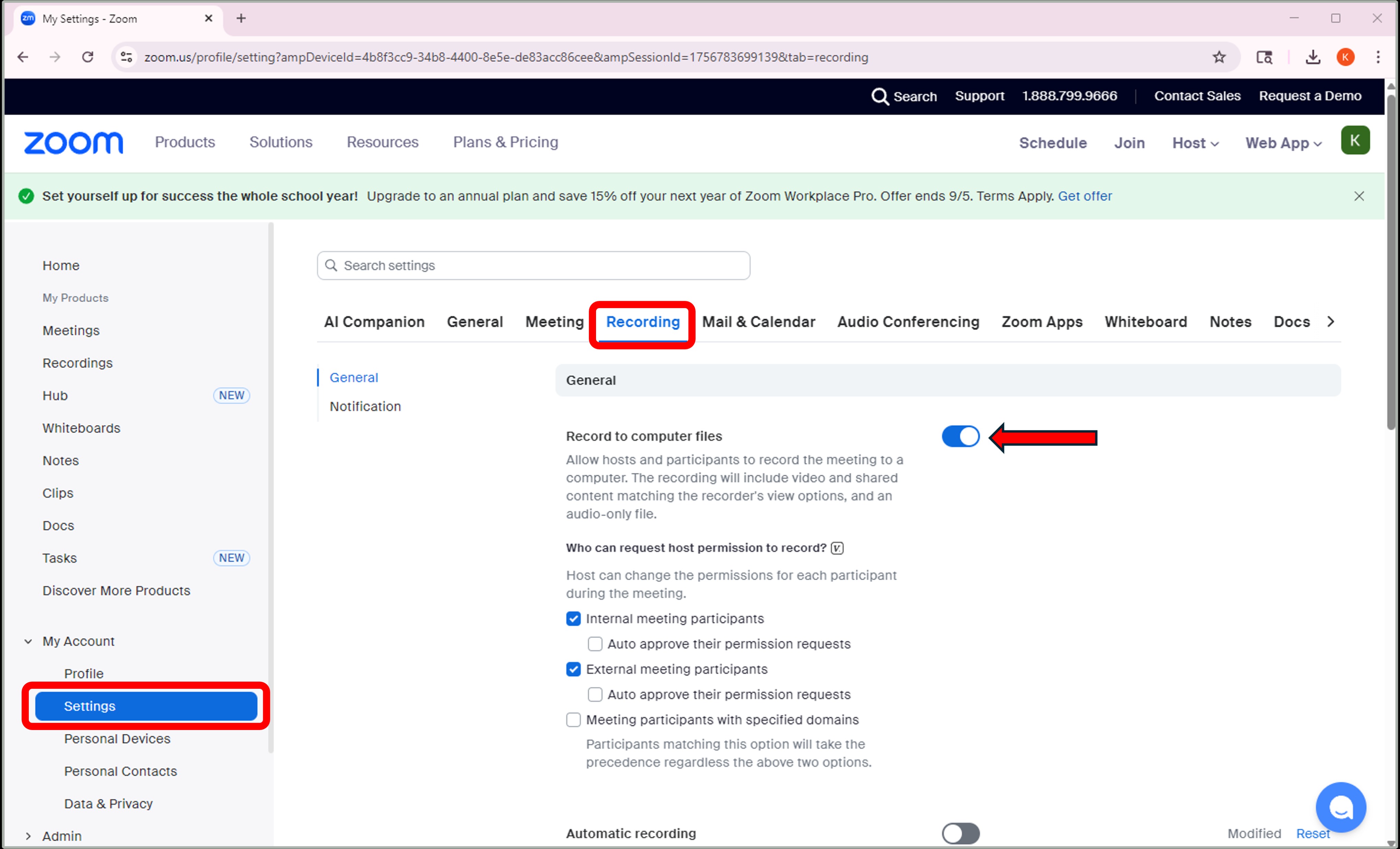
To enable computer recordings in Zoom, adjust your settings as follows:
- Log into your Zoom account from Zoom.us.
- Click on the Account tab on the right, and then Settings.
- Select Recording.
- Toggle "Record to computer files" on (it will turn blue when enabled).
Was this article helpful?
That’s Great!
Thank you for your feedback
Sorry! We couldn't be helpful
Thank you for your feedback
Feedback sent
We appreciate your effort and will try to fix the article